This issue covers geofencing when clocking in via the app and recording the original start date of a sick leave.
We announced it two weeks ago, but now it's finally here: Geofencing is available! Do you use the R&R Job app for time tracking and want more control over where your employees clock in? Then sign up to have geofencing enabled.
Are you wondering how geofencing works? Here's a quick refresher:
How does it work?
R&R uses geofencing to verify whether an employee is authorized to clock in at a specific location. For each physical location in R&R, you can specify a GPS coordinate where clocking in is permitted.
When an employee opens the R&R Job App and taps “Clock In,” the app checks whether the phone is within the setup radius of one of the physical locations. If so, the clock-in button is available. If not, a notification appears stating that the employer has specified that clocking in can only be done at the workplace. This check only takes place when an employee begins clocking in. No geolocation check is performed when clocking out, booking a break, or changing departments. The R&R Job App only determines whether an employee is allowed to clock in, but not where they worked. The location displayed in the system is still determined based on the scheduled shifts.
What about data protection?
R&R values its users’ privacy. For this reason, geofencing is designed so that the user’s location data is neither stored nor shared. The phone checks whether an employee is authorized to clock in based on their location. If so, the clock-in button becomes visible, and only the clock-in times are transmitted to R&R. So we send all approved locations to the phone instead of querying the user’s location. This means that the user’s geolocation is never transmitted to R&R.
Shortly after the release, it will be possible to exclude an employee from geofencing via the employee card. That employee can then clock in via the app as if geofencing had not been set up. This ensures that you can also clock in employees who do not have (functional) GPS on their device or who have legitimate objections to the use of their location, rather than having to resort to the duty roster, for example.
It has recently become possible to enter an initial onset date when reporting illnesses. This initial onset date is used to determine the duration of the illness. In addition, the waiting period is also determined based on this date.
The determination of the duration of the illness will affect the reports, which will better reflect the actual course of the illness. In addition, an employee may not be granted a waiting day if he or she was also ill shortly before.
This has the advantage that illnesses that have already been closed can be more easily “extended” by entering a new illness with an original start date. R&R considers this new illness to be a separate illness, apart from the determination of duration and waiting days. 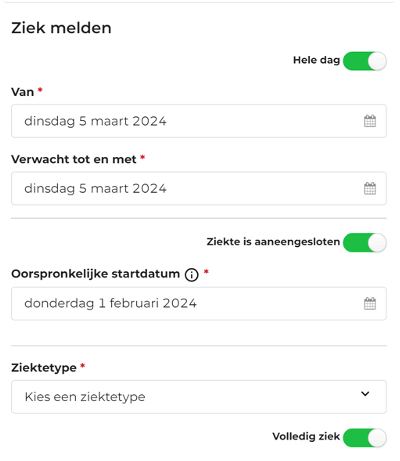
As you may have noticed, many new versions of the R&R Job App have been released in the app stores recently. These versions include new features, but we’ve also worked on improving stability. Google and Apple regularly update their requirements for apps, and we’re updating the R&R Job App accordingly.
Do you have any questions about the information above? Please contact us at aftersales@rr-wfm.com .
Would you like to read past newsletters again? You can do so at any time on our website. You can find the archive of our product updates. here.
Sincerely,
Hiska Boelema – Product Owner