In this issue, we focus on the change to the ATV accrual starting in 2025. We discuss the increased flexibility for statutory and non-statutory leave in R&R and the adjustment to the KPIs for productive hours. We also take a look at the option to create your own KPIs in the dashboard and remind you to configure your settings for the R&R Job App.
Since ATV (sometimes set up as ADV) is automatically taken during the week in which it accrues, R&R, in most cases, calculates the ATV, allocates it, and takes it immediately. Food The collective bargaining agreement states that an employee is entitled to ATV credits in the event of maternity leave or pregnancy-related illness, but is not permitted to take them. Currently, this is handled outside of R&R, and the ATV entitlement is credited manually or via a link upon the employee’s return from maternity leave.
Starting in the first week of 2025, eligibility for ATV will also be granted during maternity leave and pregnancy-related sick leave. This means it will no longer be necessary to track and resolve this outside the system.
We will repeat this message in December 2024.
Many of our Dutch users have R&R accumulate their weekly vacation time based on the number of hours worked. They can distinguish between statutory and non-statutory vacation time and apply the corresponding expiration periods.
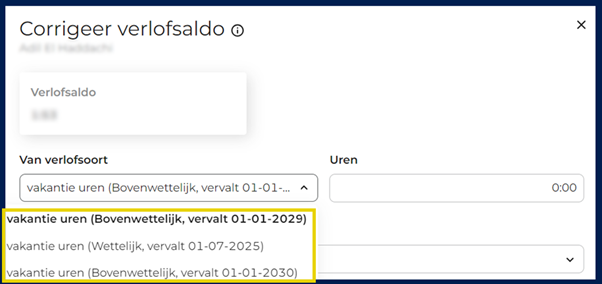
Until recently, however, it was not possible to choose between the two leave pools when manually booking leave. That has now changed. When manually booking an employee’s leave in R&R, you can now select which leave type it applies to. In this way, R&R ensures that the employee’s leave is booked against the correct leave balance for the correct leave type.
If you want to determine the productive hours for a location, you can do so in two different ways: Count all the productive hours worked by employees at that location, or count all the productive hours worked at that location. This is the difference between borrowing hours and booking hours. Almost everywhere in F&R, the decision is made to generate reports at the location level, including temporary hours, so that you have a clear picture of the hours worked and, consequently, the costs. It is only when breaking down the data by employee that temporary hours are included.
Previously, the "productive hours" metric in the dashboard did not include either temporary staffing hours or loaned hours. This has now been adjusted so that the total number of hours worked, including loaned hours, is always displayed here.

When you open a store, you’ll immediately have an overview of your KPIs. These include all the metrics you need to run your store as efficiently as possible. Wouldn’t it be great if you could customize these KPIs to suit your needs? Choose what you want to see and how you want to compare the data!
Are you only interested in the percentage of bonus hours? No problem! Or would you like to see how your hours worked compare to the originally planned hours? That's possible, too.
The configuration screen for setting your Job App preferences has been available for some time now. Next Wednesday, August 7, these settings will officially take effect. This means that, starting then, you’ll be able to see, for example, who you’re scheduled to work with, and the hours you’ve worked will also be visible in the R&R Job App.
Make sure you've configured your settings the way you want them beforehand. Forgot where to adjust the settings? Then check out our latest product update.
Do you have any questions about the information above? Please contact us at aftersales@rr-wfm.com .
Would you like to read past newsletters again? You can do so at any time on our website. You can find the archive of our product updates. here.
Sincerely,
Mark Taling – Product Owner