This issue covers CAPTCHA, availability, and a look ahead to 2024.
R&R's security mechanism was recently further enhanced with a CAPTCHA. To enable this, traffic must go through https://challenges.cloudflare.com.
If your organization uses website whitelisting, this URL must be added. Your IT provider can assist you with this.
Please note that this change does not apply if you use Single Sign-On in combination with R&R.
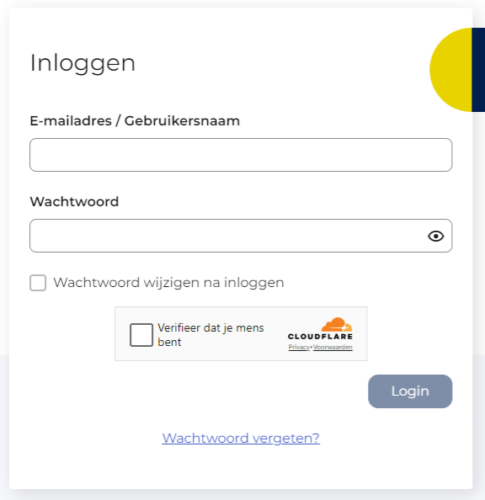
A CAPTCHA mechanism ensures that the system verifies whether the login process is being performed exclusively by a person and not by an automated process. This verification is performed in the background with every login attempt. Under normal circumstances, this verification is not visible.
If this check fails, you'll need to manually check a box before you can log in. This is shown below.
If the information provided above is insufficient or unclear, please contact our Service Desk.
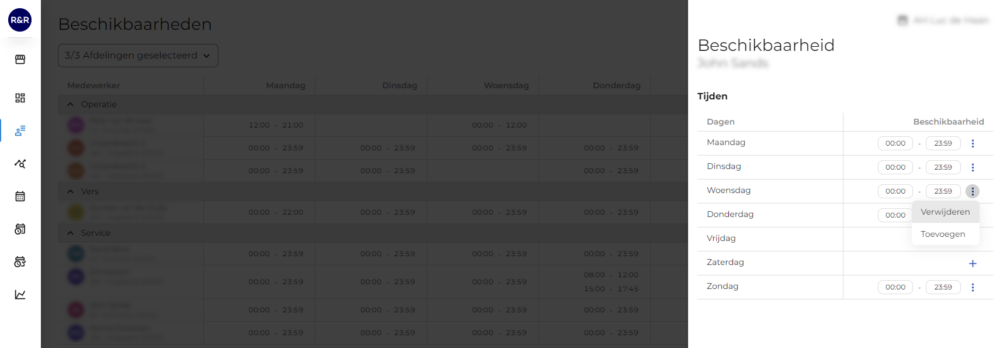
The first steps have been taken, and there is still much more to do. Those who have been paying close attention have already noticed a small change. In R&R, it used to be possible to make changes directly on the availability screen. Now, this can only be done via a side panel. When you click on an employee, a side panel appears. There, you can change the times in a similar way as before.
This setup is necessary to be able to make changes to availability on a weekly basis. And setting it up on a weekly basis is necessary to start approving availability. All in all, there are many possibilities for this feature!
Christmas is just around the corner, which means 2024 is right around the corner. As we did last year, we’d like to take a look at the topics we’ll be working on in the near future. Below are the key points from the R&R roadmap for the first quarter of 2024. We’ve divided these points into three main categories: User Convenience, the R&R Job App, and Steering with Data. With User Convenience, we provide support for the day-to-day use of R&R; with the R&R Job App, we focus on interaction with employees; and with Steering with Data, we provide more management tools and control over the process. Each of the items shown in the image below is explained below. Of course, a detailed description will follow once development on these items begins.
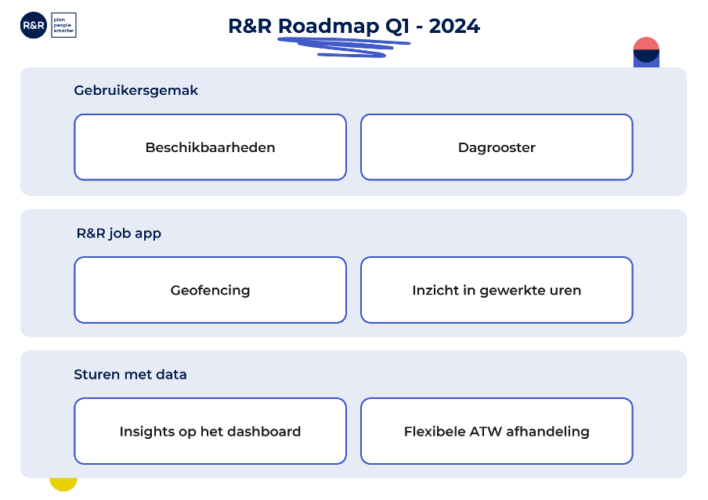
We are working hard to get availability approved by the fourth quarter of 2023. However, that won’t be the end of the story. Once the approvals are in place, we will continue to work on improving the user experience for this feature. Among other things, we will enhance communication between employers and employees when availability cannot be approved immediately.
We plan to release a new view of the daily schedule by the end of the first quarter. Our goal is to make it easier to see who is on duty and when, and to show at a glance what the staffing situation is like at any time of day.
Clocking in and out via the Job App offers flexibility, but sometimes you need a little less flexibility. With geofencing, you can define the physical location of your workshop, branch, or gas station, and the R&R Job App will only allow you to clock in or out if you are within the specified distance of that location. Use of this feature is optional and is set on a per-location basis.
Currently, once the payout has been determined, employees can see in the Job App how much they will be paid. To give employees more insight into their own work and increase their engagement, we will enable your employees to view the hours they’ve actually worked during the week. This way, employees will know immediately where they stand and can report any discrepancies right away.
For the German market, we will also incorporate this into the so-called “Arbeitszeitnachweis” (time sheet), which provides employees with a comprehensive overview of their work hours at the end of the period.
Over the past two years, R&R Insights has helped us make a lot of performance data more insightful, but it has always been displayed on a separate screen. You have to go to R&R Insights to access this data. To make management based on this data even easier, we’ll give you the option to choose which KPIs you want to display in the R&R Dashboard, based on the management data available to you in R&R Insights. This way, you can ensure that everyone has the right insights at their fingertips when they begin their planning or implementation work.
In R&R, you can disable the verification of ATW rules in the work schedule. In this case, it is not possible to schedule a shift that would result in a violation of the ATW. Since there are some exceptions to the ATW, it is not always desirable to make all rules blockable, and it may be useful to display only a warning for certain rules. We will therefore create the option to specify for each rule whether it should be blocked in the schedule or not. Since we are currently working on the ATW anyway, we will also clarify the rules for school-age employees. Among other things, we will issue a warning (never a block) if there is no school schedule in R&R, so that the ATW must be checked manually for the employee.
Do you have any questions about the information above? Please contact us at aftersales@rr-wfm.com .
Would you like to read past newsletters again? You can do so at any time on our website. You can find the archive of our product updates. here.
Sincerely,
Mark Taling – Product Owner