This issue focuses on approving time off, looking to the future with R&R Insights, rebalancing statutory and non-statutory leave, as well as correcting errors and improving quality of life.
Just before Christmas, the first minor changes were made to how availability is managed. The availability management feature was moved from the main screen to a side panel. These visual changes were necessary to enable availability updates on a weekly basis.
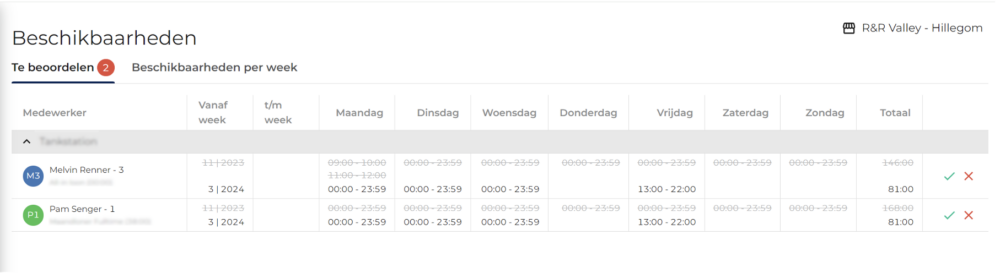
Starting January 30, it will be possible to approve new availability requests! The approval feature makes the supervisor an integral part of managing employee availability. As soon as an employee submits a new availability request, the supervisor can either approve or reject it. The availability is not implemented until it has been approved.
R&R will have an additional screen titled “Availability,” which will display all newly submitted availability entries. The first week of a new availability entry will always follow the most recently created work schedule, thereby minimizing disruptions to the scheduling process.
Moving forward, R&R will focus on improving user-friendliness. This will be achieved, among other things, by facilitating communication between employers and employees. In addition, it will be possible to share information about temporary availability so that work schedules can be created as efficiently as possible during vacations and on holidays.
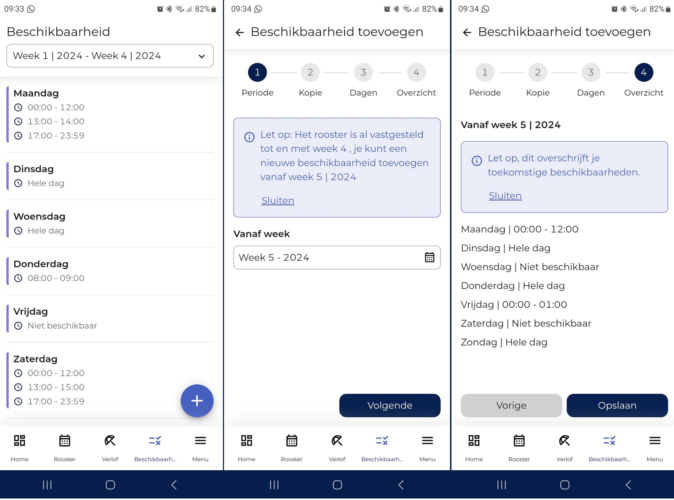
The new way of working regarding availability also has implications for employees. Starting January 30, a start week must be entered in the R&R Job App for a new availability request. The start week for a new availability is always set after the last timetable was created, to minimize disruption to the scheduling process.
The process for an employee to create an availability in the F&R Job App is similar to the process for an employee to enter a school timetable:
In addition to providing access to virtually all R&R control data, R&R Insights now also lets you see where your productive hours are headed.
Until recently, you could see how your actual productive hours for each day compared to the set standard, but for the entire week, this was only possible after the week had ended.
With the new "Actuals (Densified) " data source, you can now see how your productive hours break down throughout the week if you stay on track with your plan. This data source calculates productive hours based on already approved actuals and fills in the missing days with hours from the work schedule.
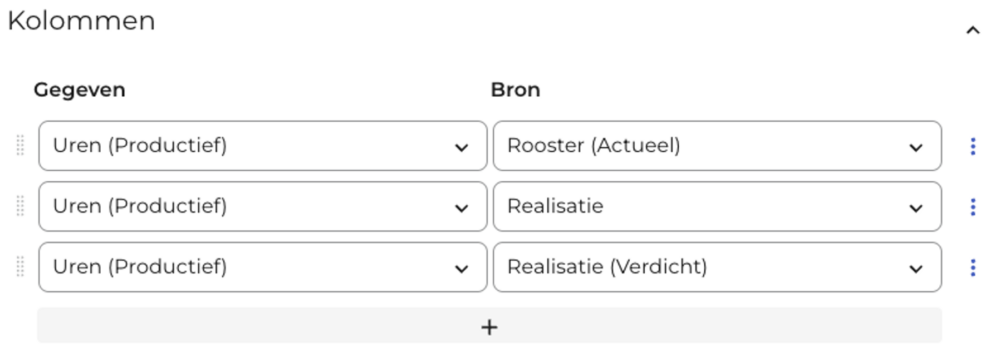
At the moment, this option is only available for the productive hours; in the near future, we will add the other productive columns here as well.
Many of our Dutch users allow R&R to accrue vacation time on a weekly basis based on hours worked. A distinction can be made between statutory and non-statutory vacation time, with the corresponding expiration periods applying.
Since both statutory and non-statutory vacation time accrues on a weekly basis, it may happen that when vacation time is accrued, non-statutory hours are taken because not all statutory vacation hours have been accrued at that point. To ensure that employees start the new year with the vacation time to which they are entitled, R&R has developed a procedure that recalculates at the end of the year how vacation time should have been deducted.
This recalculation of vacation time is performed after the final payment of the previous year. The 2023 vacation card below explicitly indicates that a recalculation has taken place.

Over the past few weeks, our teams have been busy fixing bugs and making (minor) quality-of-life improvements. These changes are all aimed at making your daily interaction with R&R even smoother. Among other things, we’ve made the following changes:
Do you have any questions about the information above? Please contact us at aftersales@rr-wfm.com .
Would you like to read past newsletters again? You can do so at any time on our website. You can find the archive of our product updates. here.
Sincerely,
Hiska Boelema – Product Owner