This release includes, among other things, the new “New Budgets Based on Forecast” feature, updated system requirements for the R&R Job App, new grouping options in R&R Insights, recovery and credit hour counters in the work schedule, as well as bug fixes and quality-of-life improvements.
Earlier this year, we announced the new feature that allows you to adjust budgets after creating a forecast. (Did you miss the original announcement? Read it here.) With the release of this feature just around the corner, it’s time to take a closer look at the new capabilities it offers.
The current practice is that, once the forecast has been prepared, the resulting budgets are presented as a framework for scheduling. Based on these frameworks, work schedules can then be created, evaluated, and finalized. This workflow will be maintained and works well for most weeks. If revenue expectations change after the forecast has been finalized, it will soon be possible to calculate new budgets based on the adjusted revenue. Once approved, these budgets can be “published” as new budgets.
How these new budgets affect the schedule process depends on what the schedule looks like at that point. If the schedule hasn't been finalized yet, the budgets displayed in the schedule will be replaced by the new budgets, and we'll display a message in the schedule indicating that the budgets have changed.
However, if the work schedule has already been set, a new task will appear in the task list prompting you to revise the current work schedule based on the new budgets. When you open the task, you will see both the old and new budgets in the department's work schedule so that you can adjust the work schedule based on all the information.
Also included here is a worksheet that can be filled out when the new budgets are published. This way, you can ensure that all current contextual information is available when adjusting the work schedule.
Once the adjustments have been made or it has been determined that no further changes are needed, you can mark the task as complete. In the plan overview, you can see for each department whether the plan has been revised and who marked the task as complete. Of course, the option to create new budgets must be enabled separately. If the feature is not activated or is not being used, the existing process remains unchanged.
We're currently working hard on developing our new job app, but of course, the security and stability of the current app are also very important. That's why we've taken a look at the minimum system requirements.
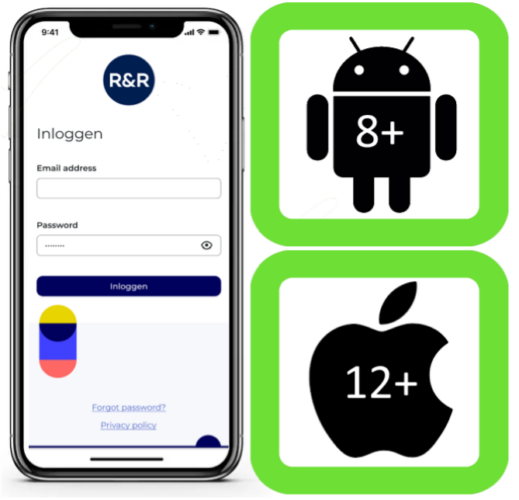
R&R currently still supports Android 7, but we will soon stop supporting it. Android will also stop supporting this version soon, which forces us to raise the minimum version for Android devices to Android 8.
For the sake of completeness, it should be noted that the minimum version of iOS supported by R&R is iOS 12. This is also the minimum version supported by Apple. This has always been the case, so there are no changes for Apple users.
Not sure which version of Android you have? Then open Settings and tap “About Phone > Android Version” at the bottom.
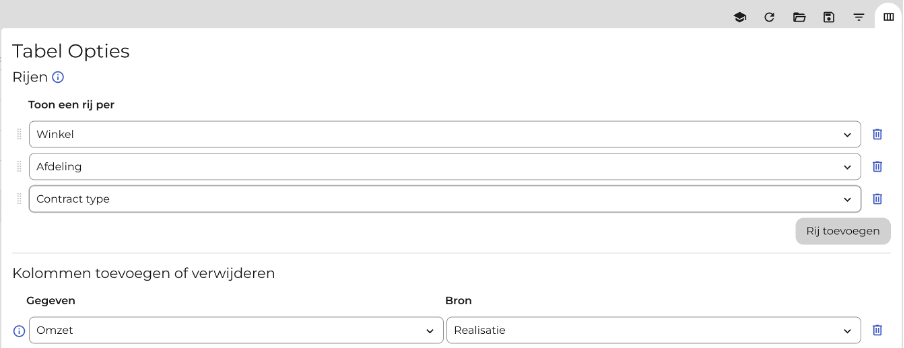
The column selection in R&R Insights will change soon. A change will be rolled out later this week that will no longer allow you to select between a store-level or department-level table using a dropdown menu; instead, you will need to explicitly add a store and/or department column to your selection.
Why is this suddenly different? Because a third option has been added: contract type. In addition to store and department, you can now also group the data by contract type. This allows you to make your analyses even more precise by examining more closely where the largest discrepancies lie.
This feature is limited to columns where data for the selected combination is logically available. For example, "Revenue by Contract Type" will result in an empty column.
Of course, we’re not going to stop here. We personally think this is a really cool feature that definitely leaves us wanting more. Maybe a breakdown by shift type, so that premium pay and overtime can be easily looked up? That, too, will be possible before the end of the summer.
It is no longer mandatory to include the store as a column, so you can now group data only by department. Since every department is unique, this still offers limited added value. Later this summer, R&R Insights will consolidate departments by name, so that you can, for example, view the sales figures for all your checkout departments at once. However, we didn’t want to wait until these features were ready before releasing the contract types. So you still have a lot to look forward to!
In our last newsletter, we discussed how to display the hours worked on the work schedule. Similarly, it is now possible to display the number of compensatory and/or credit hours for the current year. This makes it clearer for our users in Belgium whether an employee can work a few more hours this week or whether they have already reached their annual limit.
Over the past few weeks, our teams have been busy fixing bugs and making (minor) quality-of-life improvements. These changes are all aimed at making your daily interaction with R&R even smoother. Among other things, we’ve made the following changes:
Do you have any questions about the information above? Please contact us at aftersales@rr-wfm.com .
Would you like to read past newsletters again? You can do so at any time on our website. You can find the archive of our product updates. here.
Sincerely,
Mark Taling – Product Owner