This issue covers duty roster comments, R&R Insights, excluding employees from payroll exports, resetting passwords in user management, the new Job App, as well as bug fixes and quality-of-life improvements.
Roster comment feature coming soon
Sometimes, simply assigning someone a shift and a department isn't enough to create a work schedule, and you may want to include additional instructions. Soon, you'll be able to add a comment to the work schedule in R&R, which will then be visible to the employee as part of their work schedule in the R&R Job App.
Would you like to add a note to the schedule because you're creating it with one of your colleagues, or as a reminder to yourself about why you scheduled an unusual shift? Displaying the note in the Job app is optional. Turn it off so that the notification is visible only to you and to colleagues who can open the schedule in R&R.
R&R Insights Preview
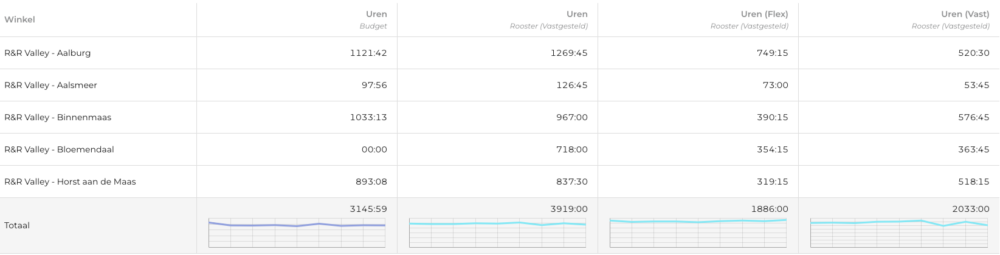
A few weeks ago, we added the ability in R&R Insights to filter by contract type to gain a more detailed insight into planning and execution. Of course, that wasn’t all… With the upcoming version of R&R Insights, you’ll be able to apply these filters to individual columns. Do you need insight into how your flexible hours are being used compared to your fixed hours? No problem—it’s just a few clicks away.
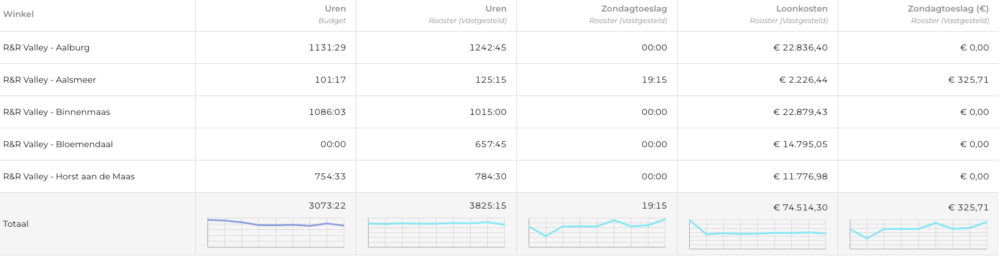
The ability to break down data by contract type is very valuable, but ultimately it’s just one axis along which you can categorize your hours. Wouldn’t it be useful to be able to do this by activity and hour type as well? We believe this will be possible in the next version. Sick hours vs. productive hours? Insights into your Sunday premium pay? Anything* you can imagine, you can now put together yourself with just a few clicks.
* Only roster, implementation, and payment data can be filtered in detail. This level of detail is not available for budgets and standards.
Exclusion of Employees from the Wage Bill Export
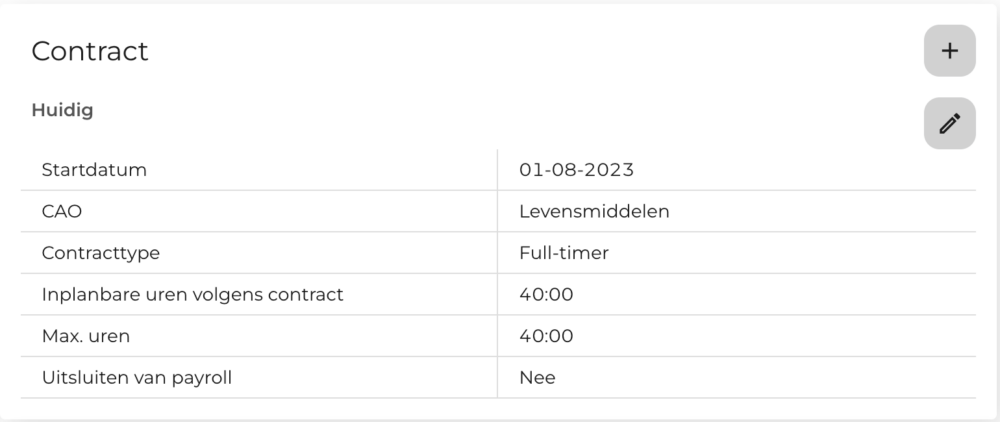
When you export an automated payroll report, there are sometimes employees who shouldn’t actually be included. Consider, for example, temporary workers whom you don’t pay directly yourself. To make this easier, you can now specify on an employee’s contract that they should be excluded from the payroll report.
Employees for whom “Exclude from Payroll” is set to “Yes” will still appear in export reports and during payouts, but they are not included in exports to external systems.
Of course, this is only possible for employees who have been manually entered into R&R. Employees who were entered into R&R via a link cannot be modified manually. Not all HRM links to R&R support the option to select employees who should be excluded from payroll. If this is desired in your situation, please let us know so we can explore the possibilities.
Reset Password via User Management
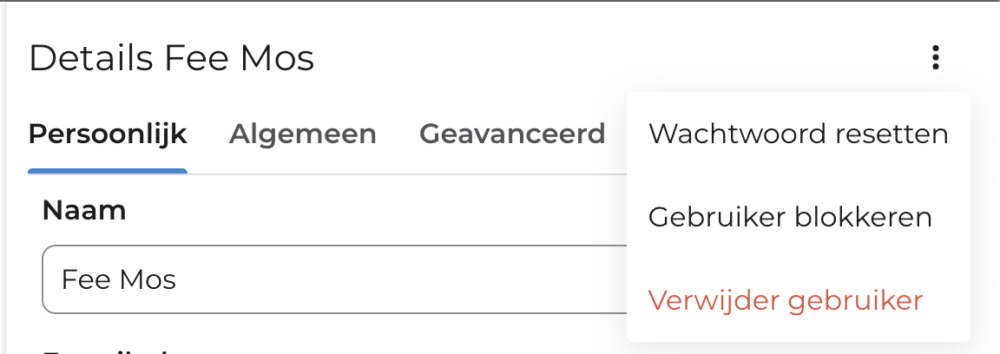
As an administrator, you can now reset the passwords of R&R users.
Users whose passwords have been reset can no longer use their current password and must therefore create a new password using the email they received for this purpose.
It is not possible for the administrator to enter a new password for the user.
The new job app will be launching soon!
We have reached the final phase of testing the new job app. The first stores have already switched to the new app for testing and are, in effect, already using it! When the job app officially goes live, there will, of course, be an update about it.
R&R Time 3.0 Hardware Clocks: Repairs and Updates Are No Longer Possible
Unfortunately, we can no longer perform repairs or updates on the R&R Time 3.0 watches. The software on these watches is severely outdated, and the hardware has been unavailable for two years.
Since we can no longer maintain the software, security and continuity issues may arise; for example, if problems occur, we will no longer be able to update the clocks.
If a defect occurs or the clocks need to be replaced, we can no longer perform repairs or updates. This means that in the event of defects and/or other problems, the entire clock set must be replaced. In this case, we offer complete new R&R Time 4.2 sets as standard.
Not sure if your company uses R&R Time 3.0 clocks? R&R Time 3.0 clocks are gray or black R&R Hardware clocks that may be hanging in your stores or other locations. If you have a black R&R clock with a white border, you are already using R&R Time 4.2.
Bug Fixes and Quality-of-Life Improvements
Over the past few weeks, our teams have been busy fixing bugs and making (minor) quality-of-life improvements. These changes are all aimed at making your daily interaction with R&R even smoother. Among other things, we’ve made the following changes:
- In the past, when entering vacation time from the employee card, a date was sometimes entered; this has now been changed.
- When registering recurring leave, it was previously possible to select a date that preceded the employee's start date; this is no longer possible.
- In the schedule overview, you can now choose between the set schedule and the current schedule; previously, only the current schedule was displayed here.
- If an employee joined the company at the beginning of the month while the previous month's payroll had already been processed, an error might have occurred when opening the payroll; this error has now been fixed. This error occurred only with monthly payroll.
- On the employee card, employees who are imported via a link can now see when their information was last updated.
- Sometimes lists would open “behind” other parts of the screen, which meant you had to scroll around awkwardly to select the right option; this has now been fixed.
- Charts in R&R Insights did not always update in real time when you adjusted a filter. This issue has now been resolved.
- When assigning new default departments to an employee, the start date of the new departments is now taken into account.
- On small screens, a scroll bar used to appear in the dashboard that allowed users to move the KPI selection out of view. This has now been adjusted so that the KPIs always remain in full view.
Any questions?
Do you have any questions about the information above? Please contact us at aftersales@rr-wfm.com .
Would you like to read past newsletters again? You can do so at any time on our website. You can find the archive of our product updates. here.
Sincerely,
Mark Taling – Product Owner

About the Author
Mark Taling
As a Product Owner at R&R, I am responsible for the functional development and strategy of our software. My goal is to provide our users with the best possible experience, both now and in the future.
As a former developer and architect at R&R, I have extensive experience with how our products work and the processes they support. I now use this experience not only to keep our products up to date, but above all to develop innovations that enhance the user experience!