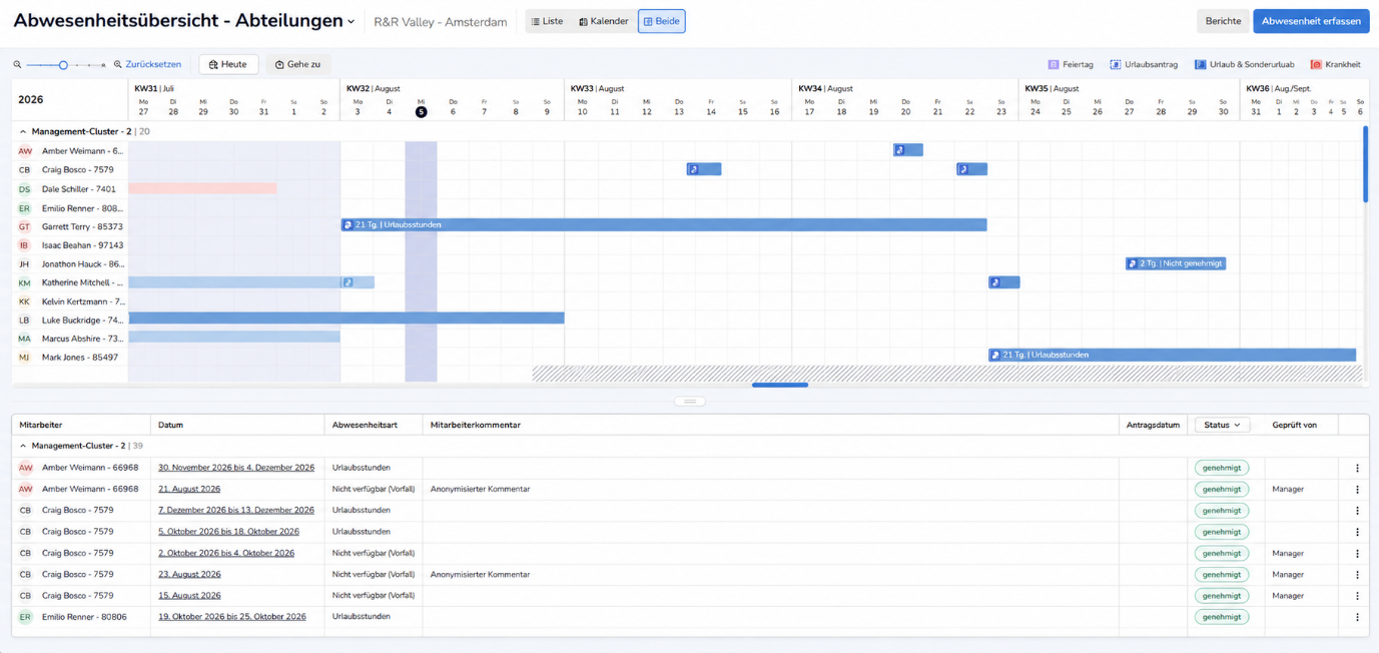
The new Absence Overview has been available since November 2, 2026. It provides you with a comprehensive overview of your employees’ absences and vacation balances, even over a longer period of time—perfect for annual vacation planning. Changes can be made directly from the overview without having to switch between different views.
In addition, we have streamlined the processes for submitting, reviewing, and processing leave requests in several areas.
In this product update, you'll learn more about the new features and improvements.
Navigation & View
You can now view an entire year and even scroll forward into future years. You can adjust the displayed time period using various zoom levels—from detailed to a comprehensive overview—as needed, allowing you to view nearly an entire year on a single screen. If the time period falls outside the displayed area, you can easily navigate to the desired time period using a scroll bar. This makes it easier to plan your annual vacation.
In addition, you can switch the view between the department and store levels, as shown in the work plan, and display the staffing levels for each department based on the number of employees still available each day.
Balances
View vacation day balances to determine, before approving vacation requests, whether the requested vacation aligns with the employee’s vacation entitlement. To do this, you can display the current balance, already approved vacation, pending vacation requests, manual adjustments, and the resulting projected year-end balance for each employee within the absence overview.
In addition, when you open the details view of a vacation request that has not yet been approved, you can now see how approving the request will affect the projected ending balance.
Leave Types
In the bars representing leave, you can now also see the leave type—this makes it easier to identify which entries actually represent recreational leave.
Time-Off Requests
Time-off requestshave been integrated into the absence overview. As a result, you no longer need to initialize the work schedule for the relevant week in order to view an employee’s time-off request, and you can take existing time-off requests into account when reviewing vacation requests.
Any questions?
Would you like to learn more about the new absence overview? Then take a look at the article in our customer portal.
Do you have any questions about this update? Feel free to email us at support@rr-wfm.com. We'll make sure your question is forwarded to the right person.